


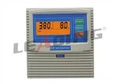
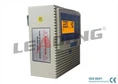


As a supplier of Multifunction Wireless Water Pump Controllers, I understand the frustration that comes with a malfunctioning device. These controllers are designed to simplify the operation of water pumps, providing wireless connectivity and a range of functions to enhance efficiency and convenience. However, like any electronic device, they can encounter issues from time to time. In this blog post, I'll share some practical steps to troubleshoot a Multifunction Wireless Water Pump Controller when it malfunctions.
Step 1: Check the Power Supply
The first thing to do when your Multifunction Wireless Water Pump Controller is not working is to check the power supply. A lack of power can cause the controller to malfunction or not turn on at all. Here's what you can do:
- Verify the Power Source: Ensure that the controller is properly plugged into a working power outlet. Check if the outlet has power by plugging in another device. If the outlet is not working, you may need to check the circuit breaker or fuse box.
- Inspect the Power Cord: Look for any signs of damage to the power cord, such as cuts, frays, or exposed wires. If you find any damage, replace the power cord immediately.
- Check the Battery (if applicable): Some Multifunction Wireless Water Pump Controllers are battery-powered. If your controller uses batteries, check if they are properly installed and have enough charge. Replace the batteries if necessary.
Step 2: Examine the Wireless Connection
Since these controllers are wireless, a poor or lost wireless connection can lead to malfunctions. Here are some steps to troubleshoot the wireless connection:
- Check the Signal Strength: Make sure that the controller is within the range of the wireless network. If the signal is weak, try moving the controller closer to the router or access point.
- Restart the Router and Controller: Sometimes, a simple restart can resolve wireless connectivity issues. Turn off the router and the controller, wait for a few seconds, and then turn them back on.
- Verify the Network Settings: Check if the controller is connected to the correct wireless network. You may need to enter the network name (SSID) and password again if the settings have changed.
- Update the Firmware: Outdated firmware can cause wireless connectivity problems. Check the manufacturer's website for any available firmware updates for your controller and install them if necessary.
Step 3: Review the Pump and Sensor Connections
The Multifunction Wireless Water Pump Controller is connected to the water pump and various sensors. Loose or damaged connections can cause the controller to malfunction. Here's what you can do:
- Inspect the Pump Connections: Check if the wires connecting the controller to the water pump are properly connected. Make sure that there are no loose or corroded connections. If you find any issues, tighten the connections or replace the wires.
- Check the Sensor Connections: The controller may be connected to sensors such as pressure sensors, flow sensors, or level sensors. Inspect the connections to these sensors and ensure that they are secure. If a sensor is not working properly, it may need to be replaced.
- Test the Sensors: Use a multimeter or other testing equipment to check if the sensors are functioning correctly. If a sensor is not providing accurate readings, it may be faulty and need to be replaced.
Step 4: Check the Controller Settings
Incorrect settings on the Multifunction Wireless Water Pump Controller can also cause malfunctions. Here are some settings to review:
- Pump On/Off Settings: Make sure that the pump on/off settings are configured correctly. Check the pressure or level thresholds at which the pump is supposed to turn on and off. If the settings are incorrect, adjust them according to your requirements.
- Timer Settings: If the controller has timer settings, check if they are set correctly. Incorrect timer settings can cause the pump to turn on or off at the wrong times.
- Alarm Settings: Review the alarm settings to ensure that they are configured correctly. If the controller is triggering false alarms, you may need to adjust the alarm thresholds or sensitivity.
Step 5: Look for Error Codes and Messages
Many Multifunction Wireless Water Pump Controllers display error codes or messages when they encounter a problem. Refer to the user manual to understand the meaning of these error codes and follow the recommended troubleshooting steps. Here's how to handle error codes:
- Note the Error Code: Write down the error code or message displayed on the controller. This will help you refer to the user manual or contact the manufacturer's support team for assistance.
- Refer to the User Manual: Look up the error code in the user manual to find out what it means and how to fix it. The user manual usually provides step-by-step instructions for troubleshooting common error codes.
- Contact Technical Support: If you are unable to resolve the issue based on the error code and the user manual, contact the manufacturer's technical support team. They can provide further assistance and guidance.
Step 6: Perform a Factory Reset
If all else fails, you may need to perform a factory reset on the Multifunction Wireless Water Pump Controller. This will restore the controller to its default settings and may resolve any software-related issues. Here's how to perform a factory reset:
- Refer to the User Manual: The process for performing a factory reset may vary depending on the model of the controller. Refer to the user manual for specific instructions on how to perform a factory reset.
- Backup Your Settings (if necessary): Before performing a factory reset, make sure to backup any important settings or configurations. You may need to re-enter these settings after the reset.
- Perform the Reset: Follow the instructions in the user manual to perform the factory reset. This usually involves pressing a combination of buttons on the controller for a certain period of time.
Additional Resources
If you are looking for more information about water pump controllers, here are some of our products that you may be interested in:
- Small Size Simplex Pump Controller Plastic Panel Material: This pump controller features a small size and a plastic panel material, making it suitable for various applications.
- Smart Deep Well Single Pump Control Box Wall Mounted: Ideal for deep well applications, this wall-mounted control box offers smart features and reliable performance.
- IP54 Protection Grade Simplex Pump Controller: With an IP54 protection grade, this pump controller is protected against dust and water splashes, making it suitable for outdoor use.
Conclusion
Troubleshooting a Multifunction Wireless Water Pump Controller when it malfunctions can be a challenging task, but by following these steps, you can often identify and resolve the issue. Remember to always refer to the user manual for specific instructions and safety guidelines. If you are still unable to fix the problem, don't hesitate to contact our technical support team for assistance.
We are committed to providing high-quality Multifunction Wireless Water Pump Controllers and excellent customer service. If you are interested in purchasing our products or have any questions, please feel free to contact us for procurement and negotiation. We look forward to working with you!


References
- Manufacturer's User Manual for Multifunction Wireless Water Pump Controller
- General Knowledge of Electronics and Wireless Technology