




As a supplier of CE Approved Single Phase Pump Control Panels, I understand the importance of ensuring these panels operate smoothly. Troubleshooting is an essential skill that can save time, money, and prevent costly downtime. In this blog, I'll share some comprehensive steps on how to troubleshoot a CE approved single phase pump control panel.
Initial Checks
Before delving into complex issues, it's crucial to perform some basic checks. First, ensure that the power supply to the control panel is intact. Check the circuit breaker or fuse associated with the panel. A tripped breaker or blown fuse can easily cause the panel to stop functioning. If the breaker has tripped, reset it. However, if it trips again immediately, there might be a more serious electrical problem.
Inspect the wiring connections within the control panel. Loose or damaged wires can lead to intermittent operation or complete failure. Look for any signs of overheating, such as discolored insulation or a burning smell. Tighten any loose connections and replace any damaged wires. Make sure to follow proper electrical safety procedures when working with wiring.
Control Panel Display and Indicators
Most modern single phase pump control panels come with a display and indicators that can provide valuable information about the panel's status. Check the display for any error messages or abnormal readings. Refer to the panel's user manual to interpret these messages. Error codes can often point directly to the source of the problem, such as a sensor malfunction or a communication issue.
Inspect the indicator lights on the control panel. These lights can indicate whether the panel is receiving power, if the pump is running, or if there are any faults. A solid or blinking light can convey different meanings, so it's important to understand what each light represents. For example, a blinking red light might indicate an over - temperature condition.
Sensor Checks
Single phase pump control panels rely on various sensors to monitor the pump's operation and the surrounding environment. Common sensors include pressure sensors, temperature sensors, and level sensors. Check the connections of these sensors to ensure they are secure. A loose sensor connection can lead to inaccurate readings and improper control of the pump.
Test the sensors using a multimeter or a dedicated sensor testing device. Compare the sensor readings with the expected values. If a sensor is providing readings that are outside the normal range, it might be faulty and need to be replaced. For instance, a pressure sensor that shows a constantly low or high pressure reading could be malfunctioning.
Relay and Contact Checks
Relays and contacts are important components in the control panel that control the flow of electricity to the pump. Over time, relays can wear out, and contacts can become pitted or dirty. Check the relays for any signs of physical damage, such as burnt contacts or a broken coil. Use a multimeter to test the continuity of the relay contacts. If a relay is not functioning properly, it can prevent the pump from starting or cause it to stop unexpectedly.
Clean the contacts using a contact cleaner if they are dirty. If the contacts are severely pitted or damaged, the relay should be replaced. Make sure to select a relay with the correct specifications for your control panel.
Motor Checks
The pump motor is the heart of the system, and problems with the motor can cause the control panel to malfunction. Check the motor's electrical connections to ensure they are tight and free of corrosion. Inspect the motor for any signs of overheating, such as a hot surface or a burning smell.
Use a multimeter to test the motor's windings for continuity. A motor with an open or short - circuited winding will not function properly. If the motor is not running, check the motor's overload protection device. This device can trip if the motor is drawing too much current, which could be due to a mechanical problem or an electrical issue.
Software and Firmware Checks
Some single phase pump control panels are equipped with software or firmware that can be updated to improve performance and fix bugs. Check if there are any available software or firmware updates for your control panel. Follow the manufacturer's instructions to install the updates properly.
A software or firmware glitch can sometimes cause the control panel to behave erratically. Updating the software or firmware can often resolve these issues. Make sure to back up any important settings before performing an update.

Specific Product Considerations
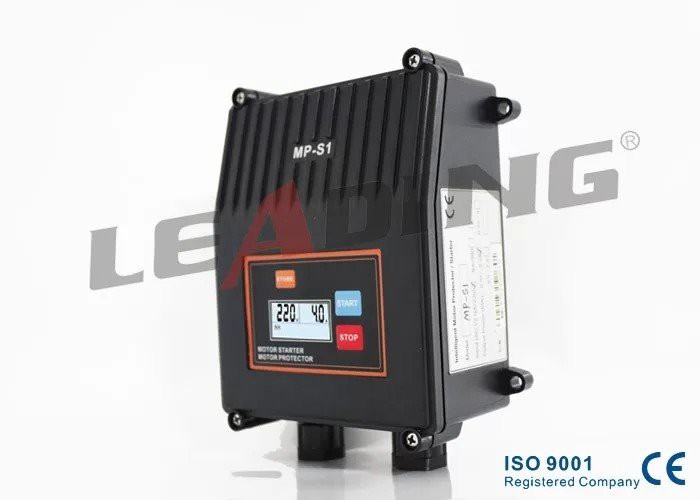
If you are using products like the Single Phase Submersible Pump Control Panel with Push Button Calibration, pay special attention to the calibration settings. Incorrect calibration can lead to improper pump operation. Refer to the product manual to perform the calibration correctly.
For the Easy Operation Single Phase Submersible Pump Control Panel CE Certification, take advantage of its user - friendly features. However, if you encounter any issues, check the settings related to the easy operation functions. Sometimes, a simple setting change can resolve a problem.
The Pump Motor Stalled Protection Single Phase Pump Control Panel with IP54 is designed to protect the motor from stalling. If the motor stall protection is triggered frequently, investigate the cause. It could be due to a mechanical blockage in the pump or an electrical problem in the motor.
Conclusion
Troubleshooting a CE approved single phase pump control panel requires a systematic approach. By performing initial checks, inspecting the display and indicators, testing sensors, relays, and the motor, and considering software and specific product features, you can identify and resolve most common problems.
If you are still unable to troubleshoot the issue on your own, it's recommended to contact a professional technician or the manufacturer's support team. They have the expertise and tools to diagnose and fix complex problems.
As a supplier of high - quality CE approved single phase pump control panels, we are committed to providing you with reliable products and excellent after - sales support. If you are interested in purchasing our products or need further assistance with troubleshooting, please feel free to contact us for a detailed discussion. We look forward to serving you and helping you keep your pump systems running smoothly.
References
- Manufacturer's User Manuals for Single Phase Pump Control Panels
- Electrical Engineering Handbooks for Pump Control Systems
- Technical Bulletins on Pump Motor and Control Panel Maintenance